Editing Text
Working with two-way or three-way file comparison often involves editing and merging.
DeltaWalker Classic makes this easy with its text editors, which offer features including:
- Unlimited, intelligent undo/redo across the two or three editors
- Wrapping of long lines, also known as soft wrap
- Find/Replace, including regular expressions
- Incremental find
- Display of whitespace characters
- Customizable tab width and type
- Line numbers
- Customizable colors
- Text drag and drop
Key Bindings
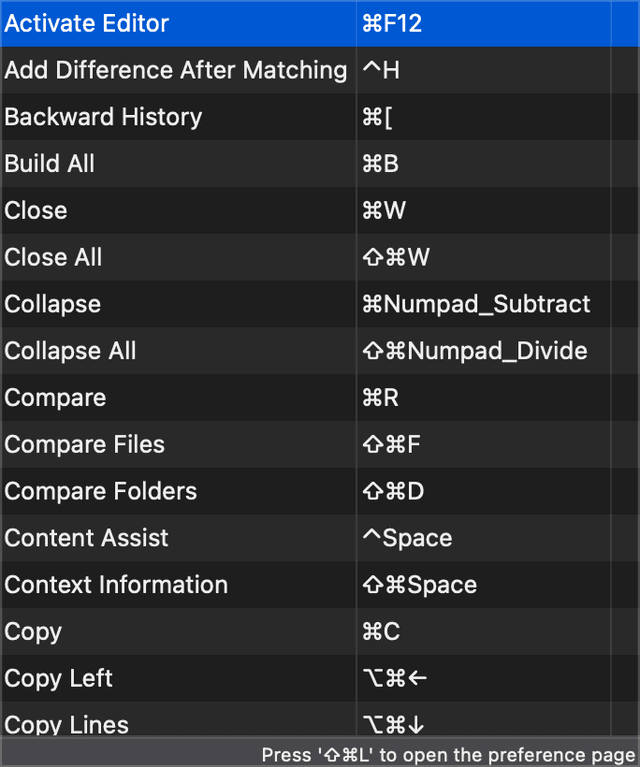
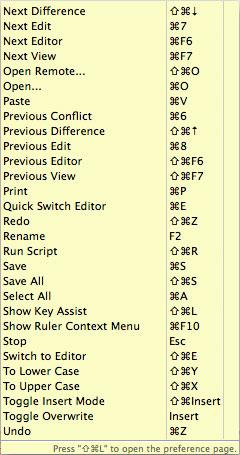
One way to quickly get a sense of DeltaWalker Classic’s editing capabilities is to look at its key bindings (Cmd+Shift+L):
Find/Replace
In addition to what you would expect, the DeltaWalker Classic Find/Replace dialog (Cmd+F) offers the Incremental and Regular expressions options.
- When Incremental is selected, the editor scrolls to and highlights the first match of the characters as you type them.
- When Regular expressions is selected, you can search with regular expressions, and content assist helps you with regular expression constructs. For details, see the Find/Replace dialog topic.
Incremental Find
If the Find/Replace dialog gets in the way, try incremental find. Press Cmd+J, or Cmd+Shift+J for reverse incremental find, and start typing—the editor scrolls to and highlights the first match of the characters you have typed. To exit incremental find mode, press Esc. To go to the next occurrence of the text you are looking for, press Cmd+K, or Cmd+Shift+K to go to the previous one.
Undo/Redo
A linked undo/redo underpins the DeltaWalker Classic text editors. Linked means that, as you change the contents of the editors, the undo/redo mechanism keeps track of these changes not just within each editor, but across all editors of a file comparison window. DeltaWalker Classic undoes these changes in the reverse order to the one they were made in, including changes spanning multiple editors. This guarantees that all your changes are undone, or redone, in the right sequence.
Personalizing the Text Editors
DeltaWalker Classic comes with carefully selected text editor defaults, and lets you customize many of them.
Personalizing the Key Bindings
The default key bindings of DeltaWalker Classic follow the most popular key bindings of similar products on each supported platform. If you work differently, change any key binding on the Keys page of the Settings window (Settings > Application > General > Keys). As with all settings, your changes are kept and are in effect the next time you launch DeltaWalker Classic.