Folder Comparison Summary Dialog
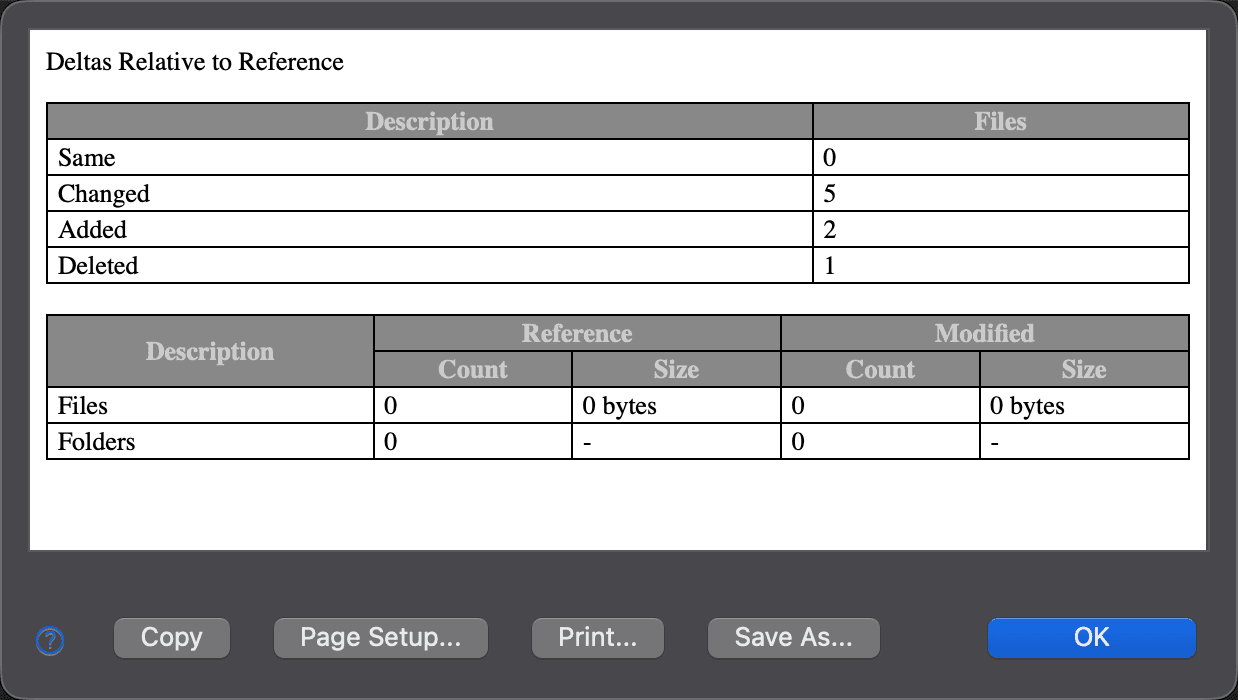
Use this dialog to see a summary of the folder comparison results. To open it, choose File > Comparison Summary… while a folder comparison is active.
Under Deltas Relative to Reference, the first table presents the same information as the status bar panels: the numbers of files that are the same, changed, added, deleted and, in a three-way folder comparison, conflicting.
The second table gives the number of files and folders, and the total size of the files, in each folder of the comparison. The status bar does not show this information.
| Control | Description |
|---|---|
| Copy | Copies the summary to the clipboard, both as tab-separated text and as HTML. |
| Page Setup… | Opens the Page Setup dialog, so that you can adjust the page settings before printing. |
| Print… | Opens the Print dialog, so that you can print the summary. |
| Save As… | Opens the Save File dialog, so that you can save the summary as an HTML file. |
| OK | Closes the dialog. |
Appearance
See Also
Dernière mise à jour le