Trial Expiration Reminder Dialog
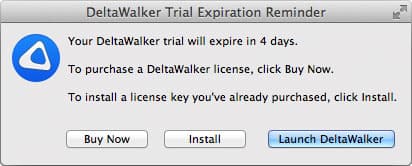
When five days or fewer are left in your trial, DeltaWalker Classic shows this dialog at startup to remind you that the trial is about to expire. The dialog tells you how many days are left and what you can do next.
When the trial ends, comparisons are paused until you activate DeltaWalker Classic Free or a paid edition. The same choices then appear in the DeltaWalker Classic Trial Ended dialog: at startup, once when the trial runs out while DeltaWalker Classic is running, and whenever you try to open a comparison.
We hope you’ve found DeltaWalker Classic useful and fun.
| Control | Description |
|---|---|
| Get Classic Free | Opens deltawalker.com in your web browser, where you can get DeltaWalker Classic Free. We email you an activation code for it; Free takes over when the trial ends. |
| Buy Pro, Buy Oro | Opens the DeltaWalker Classic store in your web browser, where you can securely buy the Pro or the Oro edition. |
| Enter Activation Code… | Lets you activate DeltaWalker Classic with an activation code you already have. |
| Launch DeltaWalker Classic or Continue Using DeltaWalker Classic | Closes the dialog and continues: at startup, it launches DeltaWalker Classic. After the trial has ended, you can keep working in DeltaWalker Classic, but comparisons stay paused. |
The dialog stays open after Get Classic Free, Buy Pro or Buy Oro, so that you can enter your activation code as soon as you have it.
Appearance
See Also
Dernière mise à jour le