Activate DeltaWalker Classic Dialog
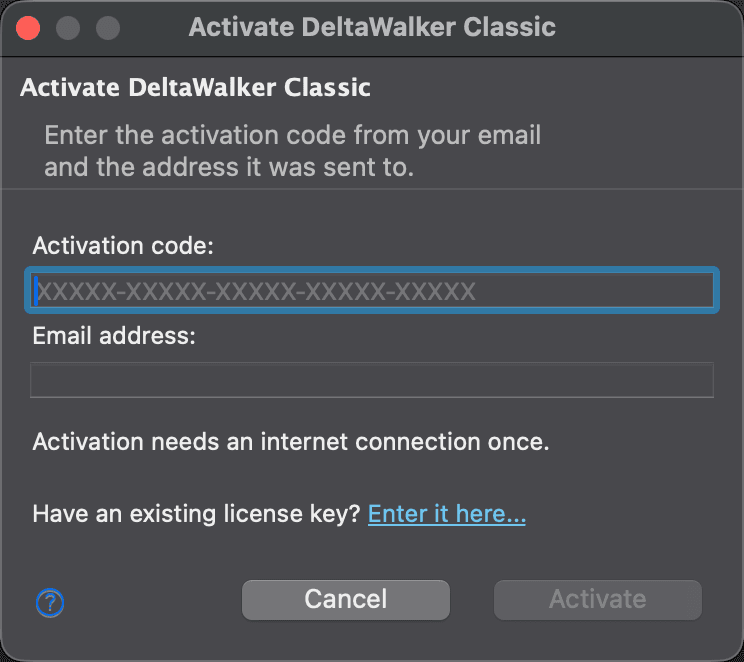
Use this dialog to activate DeltaWalker Classic with the activation code from your email:
- You got DeltaWalker Classic Free, to keep using DeltaWalker Classic for free after the trial.
- You bought DeltaWalker Classic Pro or Oro, during or after the trial, or to upgrade from Free.
To open it, choose Help > Activate DeltaWalker Classic…. You can also open it from the trial reminder (Enter Activation Code…) and from the Enter Existing License Key dialog (Activate DeltaWalker Classic… under “Have an activation code?”).
Enter the code and the email address it was sent to, then click Activate. DeltaWalker Classic upgrades in place, with no new download, and the new edition is available right away.
| Control | Description |
|---|---|
| Activated on this computer | Shown when this computer already has an activated license: its edition and the address it was activated with. You can still activate another code, for example to upgrade. |
| Activation code | The code from your email, in the form XXXXX-XXXXX-XXXXX-XXXXX-XXXXX. |
| Email address | The address the code was sent to. |
| Have an existing license key? Enter it here… | Opens the Enter Existing License Key dialog, for a DeltaWalker Classic license key you already have. |
| Activate | Activates the code. Available once both fields are filled in. |
| Cancel | Closes the dialog without activating. |
Activation needs an internet connection once; after that, DeltaWalker Classic works offline. When the activation succeeds, the dialog says which edition is now activated, and Activate becomes Close. If you activate DeltaWalker Classic Free on a computer that already has Pro or Oro, DeltaWalker Classic keeps the paid edition, which includes everything in Free.
If the activation fails, the dialog says why, for example a typo in the code, an address that is not the one the code was sent to, or a license that is already active on as many computers as it allows. If you paste a DeltaWalker Classic license key into the Activation code field, the dialog tells you so, sends nothing, and points you to the Enter Existing License Key dialog.
Appearance
Access
Menu
Help > Activate DeltaWalker Classic…
License Deactivated
If Deltopia has deactivated a DeltaWalker Classic license key, DeltaWalker Classic shows a warning titled License deactivated: “Your license has been deactivated. Please contact support if you believe this is a mistake.” DeltaWalker Classic checks the status of a license key in the background when it starts, at most every 12 hours. It shows the warning when the check finds the key newly deactivated, or the first time you try to open a comparison in a session if the key was already deactivated; it shows it once per session. Until the license is restored or replaced, comparisons do not open. The warning does not appear, and nothing is blocked, while a Free, Pro or Oro license activated with an activation code is in effect. If you think the deactivation is a mistake, contact support.