Set Date Modified Dialog
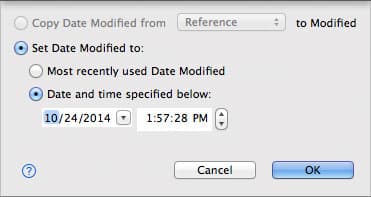
Use the Set Date Modified dialog to change the date and time when the selected files and folders were last modified. To open it, select one or more items in a folder comparison, right-click them and choose Set Date Modified…. The dialog changes the items on the side where you right-clicked—the destination.
| Control | Description |
|---|---|
| Copy Date Modified from side to side | Gives the selected items on the destination side the date and time of the corresponding items on the side you pick in the list. Available only when at least one selected item exists on another side. |
| Set Date Modified to: | Gives the selected items on the destination side one of the following dates and times. |
| Most recently used Date Modified | The date and time you last set with this dialog. |
| Date and time specified below: | The date and time you set in the date and time controls. |
DeltaWalker Classic remembers your choices for the next time you open the dialog.
Appearance
See Also
Última actualización el