Three-Way Text Comparison
Three-way comparison is the automated analysis of the differences between two modified files and a common reference file, sometimes called the common ancestor. It often involves a revision control system that hosts the reference as well as one of the modified files. The analysis computes the changes between each modified file and the reference file, and builds a relationship model that makes it possible to visualize them and to merge the two files into what becomes a new revision of the reference file.
Three-way comparison is available in DeltaWalker Classic Pro and Oro, and during the trial.
The need for a three-way file comparison often arises in collaborative projects. For instance, a contributor has modified a local copy of a file that is under source control. While she worked on the file, another contributor changed the same file and committed the changes to the repository. When the first contributor decides to commit her changes, the source control system lets her know that the file has been modified in the meantime and that she needs to consolidate the two sets of changes. These are the kinds of scenarios where a three-way comparison is most helpful.
A three-way comparison offers more than two standalone two-way comparisons between each of the modified files and the common reference: it reflects how far the two derivative works agree with each other and with their reference. A conflicting change is a case in point—it exists only in the context of a three-way comparison, when a block of text has been modified differently in both derivative works.
Opening a three-way comparison
- Open a new two-way file comparison and switch it to the three-way layout: click the Layout toolbar button and choose Compare Three-Way (Vertical), or choose Window > Compare Three-Way (Vertical). The editor for the reference file moves from the left to the middle, the first modified file goes to its left, and the second to its right.
- If a three-way folder comparison is open, double-click a triplet of files to open them in a three-way file comparison.
- If your comparison history contains three-way file comparisons, select one of them from the File Comparison toolbar dropdown or from File > File Comparison.
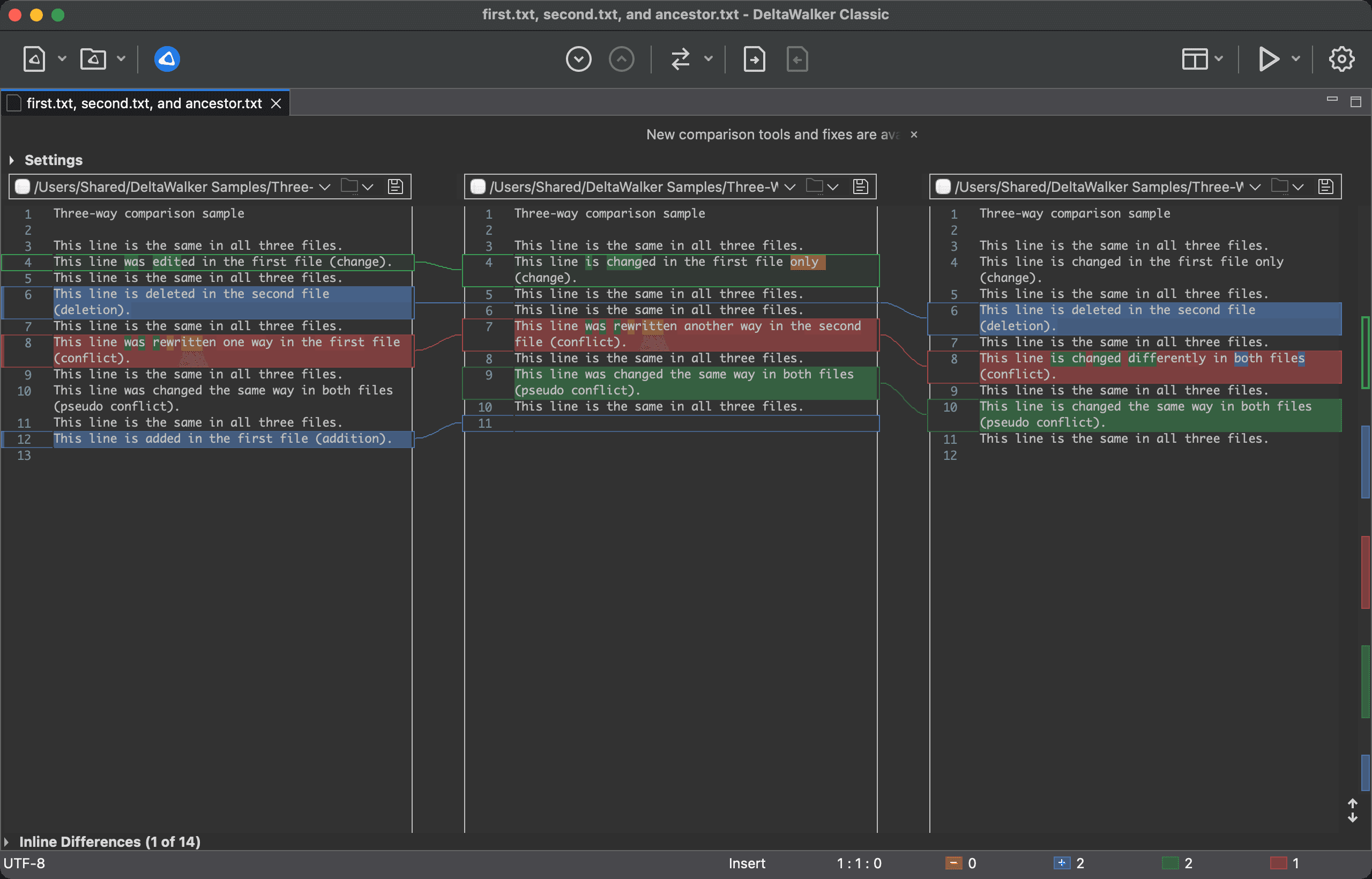
The following screenshot shows a simple three-way text file comparison containing one of each possible relationship—deletions, additions, changes, conflicts, and pseudo conflicts:
Switching Between Two-Way and Three-Way Layouts
You can switch the active comparison between two-way and three-way at any time, with the Layout toolbar button (click it to open its menu) or the Window menu:
- Compare Two-Way (Vertical) compares two files.
- Compare Three-Way (Vertical) compares three, with the reference in the middle.
The current layout is checked in both places. The choices are unavailable while the comparison is running. Three-way is included in DeltaWalker Classic Pro and Oro, and during the trial. DeltaWalker Classic Free has no Layout button, and in Free Window > Compare Three-Way (Vertical) is unavailable (the Mac App Store version leaves it out).
Putting the comparison to work
What you know from two-way comparison about browsing differences, editing the files being compared, and merging them with standard commands carries over to three-way comparison. Although three-way comparison introduces a new participant in the analysis—the ancestor file—it is usually enough to base editing and merging decisions on the differences between two of the three files at a time.
Differences in agreement
In well-planned collaborative software development, two works that share a common origin usually have most of their differences from that origin in separate, unrelated blocks of text.
Typical results of such scenarios are additions and deletions, relative to the ancestor, that are present in only one of the files, while the corresponding blocks in the other file remain unchanged. In these cases, apply your two-way comparison skills to either accept the modifications into the ancestor or reject them.
It is not uncommon for the authors of the derivative works to make the same change in their modified versions. Since these changes are in agreement, two-way comparison and editing techniques apply directly as well.
Conflicting differences
DeltaWalker Classic detects different modifications to the same blocks of original text and brings them to your attention for analysis and resolution. These differences require manual resolution; by default, the areas containing them are outlined in red. To keep your work flowing even in these cases, DeltaWalker Classic gives you full-featured text editors with ample editing power and merging flexibility.
To jump between conflicts, use Navigate > Next Conflict (Cmd+5) and Navigate > Previous Conflict (Cmd+6).